
Target the shoppers you mean. Offer the reward that fits. Combine them your way.
Combine a shopper’s purchase history, what is in the cart, where they are, their loyalty tier and the time of day, all in one rule. Add any reward, stack offers under your own rules, and set real-time limits. That is how you build promotions no template app can run.
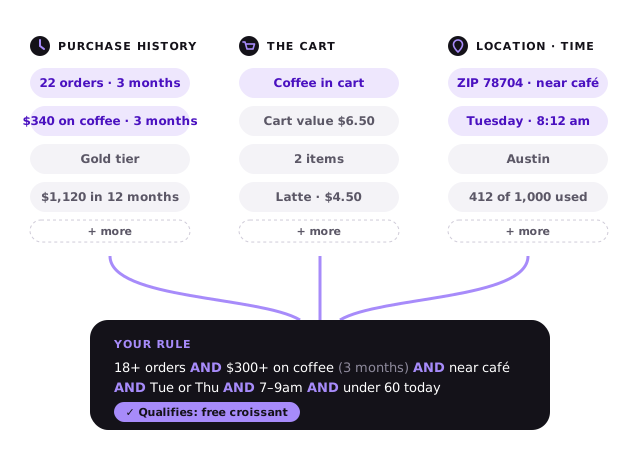
Everything you can target on
Use any of these as a condition in a promotion, alone or together. Conditions decide who qualifies. Then Engage’s machine learning decides how each shopper sees the offers.
Purchase history
- Number of orders
- Total amount spent
- Amount spent on a product or product group
- Quantity bought of a product or product group
- Loyalty tier
The cart
- Cart value
- Number of items
- Items from a product or product group
- Value or quantity of a product group in the cart
- Any combination of items, such as cleanser AND serum
Location
- ZIP or postal code
- City
- State or region
- Areas you define yourself, such as “near our downtown store”
Time
- Hours of the day, such as 7–9am
- Days of the week
- Start and end dates
- Festival and season periods
Your own product groups, not a fixed catalog
Many conditions and rewards work on product groups. You define them yourself, in any way that suits your store.
- A category, such as “Coats” or “Skincare”
- A brand
- Any hand-picked set, such as “Matching bags” or “Festival gifts”
Mix history, cart, location and time in one rule
Many promotion tools target one thing at a time: a segment, or a cart value. PerkQi lets you join conditions with AND and OR, so you can target the shopper you actually have in mind.
The right reward for each shopper
Money off is only one option. Often a gift or points means more to the shopper and costs you less.
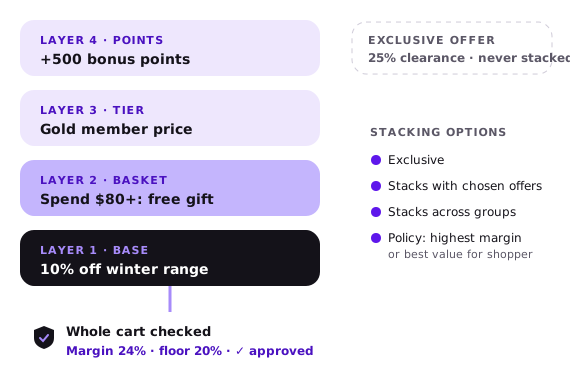
Several offers on one order, under your rules
A shopper can qualify for more than one promotion. For each promotion, you choose how it combines with others:
When offers compete, a store-wide policy decides: best value for the shopper, or highest margin for you. An item-level reward stays on its item. A 20% bag discount applies to the bag only, and a cart-level offer can still apply to the rest of the cart. Margin protection works on every order, whatever the stacking.
Real-time limits on every promotion
Limits are checked as each order happens, not at the end of the day.
Budget and redemption caps
Set a total budget and a maximum number of redemptions. The promotion stops when either is reached, or at its end date.
Daily and weekly limits
Limit how many times a promotion can be used per day or per week, for the whole promotion.
Per-customer limits
Limit how often one customer can use it, such as once per week, to stop misuse.
Promotions your customers enjoy
Combine conditions, rewards, stacking and limits to build promotions that feel like a game. Each one is still checked against your margin.
Spend to unlock
A cart-value condition with a nudge. The reward unlocks the moment the cart crosses the line.
Complete the set
An item combination in the cart, with a nudge as soon as the first item is added.
Regulars’ reward
Purchase-history conditions reward your best customers, not everyone.
Layered rewards
Several offers stack on one order, each with its own conditions.
Limited daily drops
Daily limits create real urgency and stop exactly where you set them.
Neighborhood offers
Target the ZIP codes or areas you define around a store or event.